

User Flows
Step-by-step diagrams of the eight key journeys through Objectuve — four core flows (acquisition, daily check-in, goal lifecycle, coach) and four supporting flows (community join, supporter upgrade, feedback submission, achievement unlock). Companion to user-guide.md (prose reference) and site-map.md (the full route tree).
Scope: consumer app only. Each flow maps to one or more sections in the user guide.
Source of truth: ionic_frontend/src/router/index.ts for routing and guards. User-guide section anchors are referenced in node labels. Regenerate PNG exports with cd docs_site && npm run docs:diagrams.
Diagram conventions:
- Rounded rectangles
[Screen]— pages/views the user sees - Diamonds
{Decision}— branches driven by user choice - Hexagons
{{Gate}}— route guards / system checks - Stadiums
([Terminal])— entry and exit points - Trapezoids
[/Action/]— user actions that emit events or trigger jobs
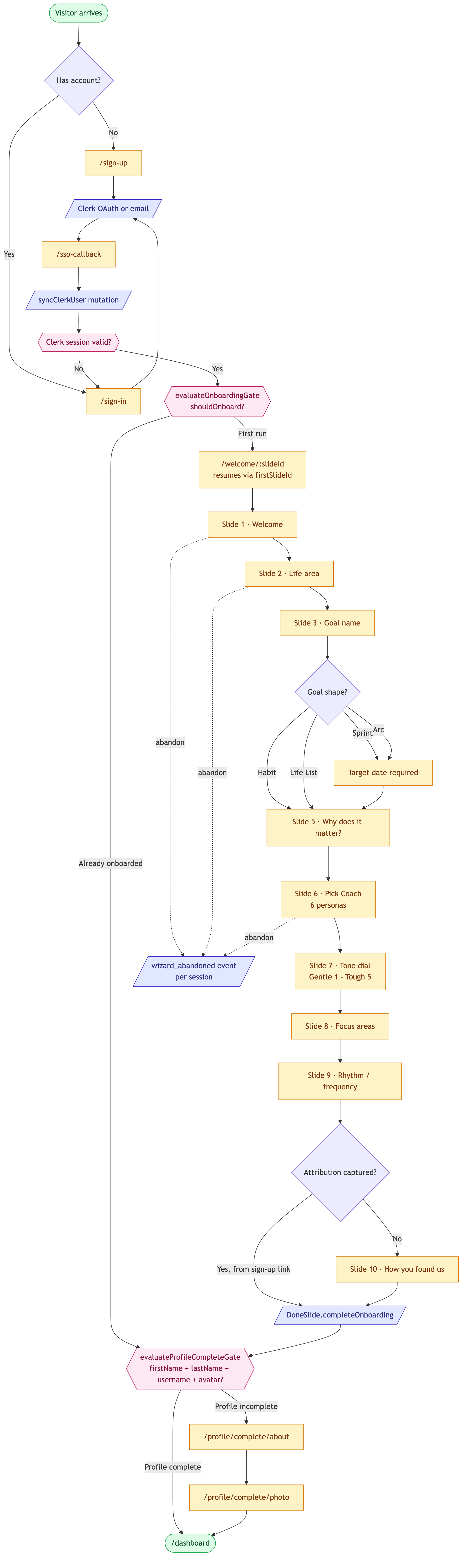
Flow A — Acquisition: sign-up → onboarding → profile completion
Goal: First-time visitor creates an account and lands on a usable Dashboard with at least one goal and a Coach configured.
Entry points:
- Marketing landing CTA →
/sign-up - Returning user hitting any authed URL while signed-out → redirected to
/sign-in?redirect=…
Exit condition: User reaches /dashboard with onboardingCompletedAt set on their User record.
Maps to user-guide §1 Getting started and §7 Meet your Coach. Deeper architecture detail in onboarding-flow.md.
flowchart TD
  Start(["Visitor arrives"]):::terminal --> Entry{"Has account?"}
  Entry -- "No" --> SignUp["/sign-up"]:::screen
  Entry -- "Yes" --> SignIn["/sign-in"]:::screen

  SignUp --> Clerk[/"Clerk OAuth or email"/]:::action
  SignIn --> Clerk

  Clerk --> SsoCallback["/sso-callback"]:::screen
  SsoCallback --> TransferableNative Android Google,<br/>no existing account?:::gate
  Transferable -- "No" --> SyncUser[/"syncClerkUser mutation"/]:::action
  Transferable -- "Yes, transferable" --> Consent["AgreeToTermsModal<br/>Terms & Privacy consent"]:::screen
  Consent -- "Accept" --> SyncUser
  Consent -- "Decline / dismiss" --> Declined{"Review and agree,<br/>or back to sign in?"}
  Declined -- "Review and agree" --> Consent
  Declined -- "Back to sign in" --> SignIn
  SyncUser --> AuthGuardClerk session valid?:::gate
  AuthGuard -- "No" --> SignIn
  AuthGuard -- "Yes" --> OnboardingGateevaluateOnboardingGate<br/>shouldOnboard?:::gate

  OnboardingGate -- "Already onboarded" --> ProfileGate
  OnboardingGate -- "First run" --> WelcomeStart["/welcome/:slideId<br/>resumes via firstSlideId"]:::screen

  WelcomeStart --> S1["Slide 1 · Welcome"]:::screen
  S1 --> S2["Slide 2 · Life area"]:::screen
  S2 --> S3["Slide 3 · Goal name"]:::screen
  S3 --> S4{"Goal shape?"}
  S4 -- "Sprint" --> S4a["Target date required"]:::screen
  S4 -- "Arc" --> S4a
  S4 -- "Habit" --> S5
  S4 -- "Life List" --> S5
  S4a --> S5["Slide 5 · Why does it matter?"]:::screen
  S5 --> S6["Slide 6 · Pick Coach<br/>6 personas"]:::screen
  S6 --> S7["Slide 7 · Tone dial<br/>Gentle 1 - Tough 5"]:::screen
  S7 --> S8["Slide 8 · Focus areas"]:::screen
  S8 --> S9["Slide 9 · Rhythm / frequency"]:::screen
  S9 --> S10{"Attribution captured?"}
  S10 -- "No" --> S10a["Slide 10 · How you found us"]:::screen
  S10 -- "Yes, from sign-up link" --> Done
  S10a --> Done[/"DoneSlide.completeOnboarding"/]:::action
  Done --> ProfileGateevaluateProfileCompleteGate<br/>firstName + lastName + username + avatar?:::gate

  ProfileGate -- "Profile complete" --> Dashboard
  ProfileGate -- "Profile incomplete" --> ProfileAbout["/profile/complete/about"]:::screen
  ProfileAbout --> ProfilePhoto["/profile/complete/photo"]:::screen
  ProfilePhoto --> Dashboard(["/dashboard"]):::terminal

  S1 -. "abandon" .-> Abandoned[/"wizard_abandoned event<br/>per session"/]:::action
  S2 -. "abandon" .-> Abandoned
  S6 -. "abandon" .-> Abandoned

  classDef screen fill:#fef3c7,stroke:#d97706,color:#78350f
  classDef terminal fill:#dcfce7,stroke:#16a34a,color:#14532d
  classDef gate fill:#fce7f3,stroke:#be185d,color:#831843
  classDef action fill:#e0e7ff,stroke:#4338ca,color:#312e81
Cross-references:
ionic_frontend/src/composables/useOnboardingGate.ts—shouldOnboardlogicionic_frontend/src/composables/useOnboardingFlow.ts— slide state machineevaluateProfileCompleteGate— profile-completion gate (router/index.ts:40)- Abandonment instrumentation:
trackOnboardingEvent('wizard_abandoned', …)in router/index.ts (Phase 36 Plan 02, METRIC-01) - Native Android Google transfer + consent branch (OBJ-2599):
docs/architecture/authentication.md§ Native Architecture step 4,docs/development/clerk-native-api-gotchas.md§ Transfer sign-up needslegal_accepted
Flow B — Daily check-in (the ~10 min/day activation loop)
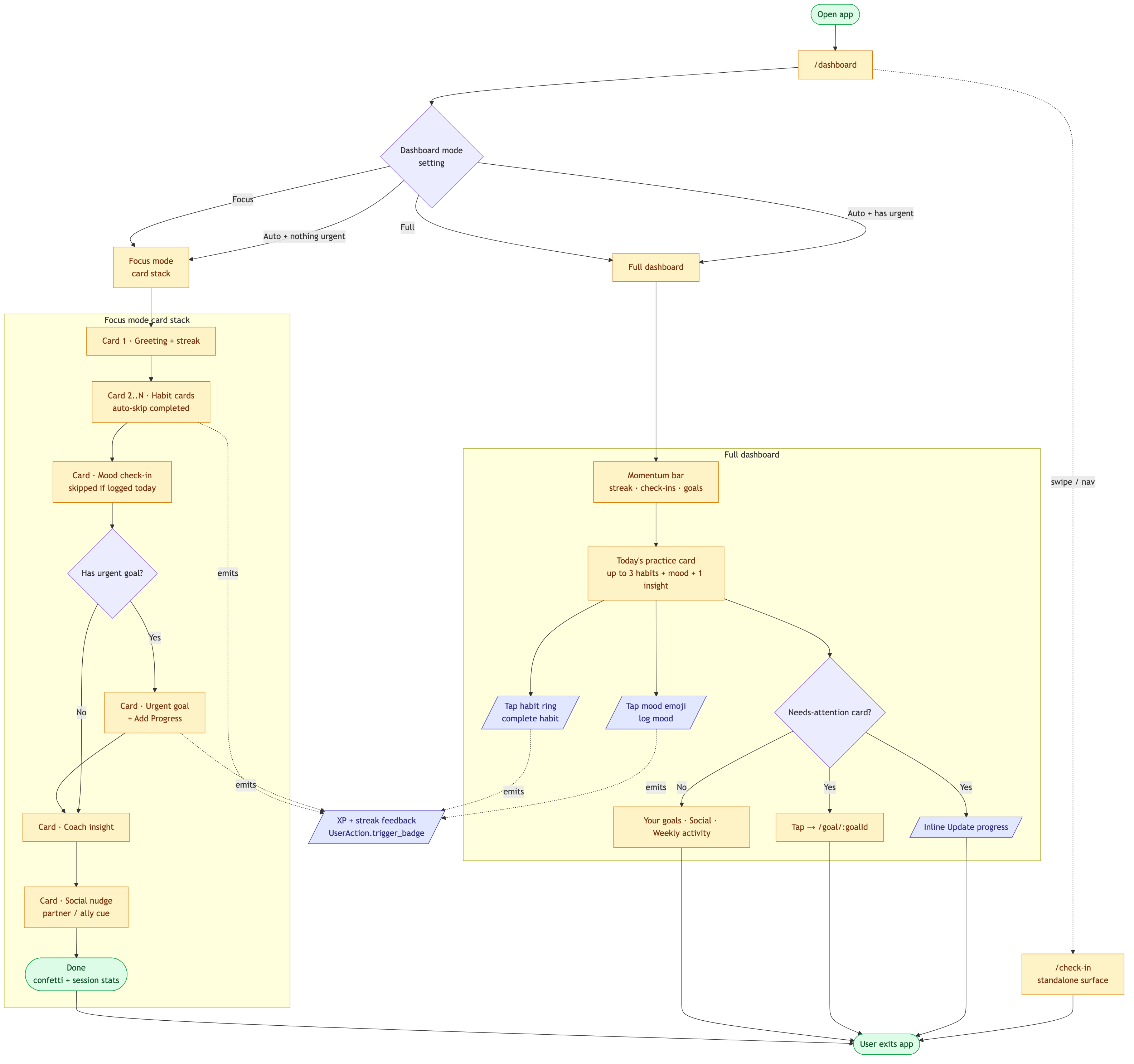
Goal: Existing user logs habits, mood, and any urgent goal progress in a single short session, then leaves the app.
Entry points:
- Push notification deep link →
/dashboard - App icon launch →
/dashboard - Streamlined widget →
/check-in
Exit condition: User leaves the app (back to home screen, closes tab). The "Done" celebration screen in Focus mode is the explicit success state.
Maps to user-guide §2 Your dashboard, §5 Habits, §6 Mood check-in, §8 Insights and Coach modal.
flowchart TD
  Start(["Open app"]):::terminal --> Dashboard["/dashboard"]:::screen
  Dashboard --> ModeCheck{"Dashboard mode<br/>setting"}

  ModeCheck -- "Focus" --> CardStack["Focus mode<br/>card stack"]:::screen
  ModeCheck -- "Full" --> FullView["Full dashboard"]:::screen
  ModeCheck -- "Auto + nothing urgent" --> CardStack
  ModeCheck -- "Auto + has urgent" --> FullView

  subgraph FocusFlow["Focus mode card stack"]
    direction TB
    C1["Card 1 · Greeting + streak"]:::screen
    C2["Card 2..N · Habit cards<br/>auto-skip completed"]:::screen
    C3["Card · Mood check-in<br/>skipped if logged today"]:::screen
    C4{"Has urgent goal?"}
    C4a["Card · Urgent goal<br/>+ Add Progress"]:::screen
    C5["Card · Coach insight"]:::screen
    C6["Card · Social nudge<br/>partner / ally cue"]:::screen
    C7(["Done<br/>confetti + session stats"]):::terminal

    C1 --> C2 --> C3 --> C4
    C4 -- "Yes" --> C4a --> C5
    C4 -- "No" --> C5
    C5 --> C6 --> C7
  end

  subgraph FullFlow["Full dashboard"]
    direction TB
    F1["Momentum bar<br/>streak · check-ins · goals"]:::screen
    F2["Today's practice card<br/>up to 3 habits + mood + 1 insight"]:::screen
    F2a[/"Tap habit ring<br/>complete habit"/]:::action
    F2b[/"Tap mood emoji<br/>log mood"/]:::action
    F3{"Needs-attention card?"}
    F3a["Tap → /goal/:goalId"]:::screen
    F3b[/"Inline Update progress"/]:::action
    F4["Your goals · Social · Weekly activity"]:::screen

    F1 --> F2
    F2 --> F2a
    F2 --> F2b
    F2 --> F3
    F3 -- "Yes" --> F3a
    F3 -- "Yes" --> F3b
    F3 -- "No" --> F4
  end

  CardStack --> C1
  FullView --> F1

  C7 --> Leave
  F4 --> Leave
  F3a --> Leave
  F3b --> Leave

  Dashboard -. "swipe / nav" .-> CheckInPage["/check-in<br/>standalone surface"]:::screen
  CheckInPage --> Leave(["User exits app"]):::terminal

  F2a -. "emits" .-> XP[/"XP + streak feedback<br/>UserAction.trigger_badge"/]:::action
  F2b -. "emits" .-> XP
  C2 -. "emits" .-> XP
  C4a -. "emits" .-> XP

  classDef screen fill:#fef3c7,stroke:#d97706,color:#78350f
  classDef terminal fill:#dcfce7,stroke:#16a34a,color:#14532d
  classDef action fill:#e0e7ff,stroke:#4338ca,color:#312e81
Cross-references:
- Dashboard mode setting: user-guide §2 Dashboard mode setting
- Streak / XP back-end:
app/interactions/triggersUserAction.trigger_badge(:habit_check_in)etc. (see CLAUDE.md for the Interaction pattern) - Anti-social-app philosophy:
docs/brand/brand.md
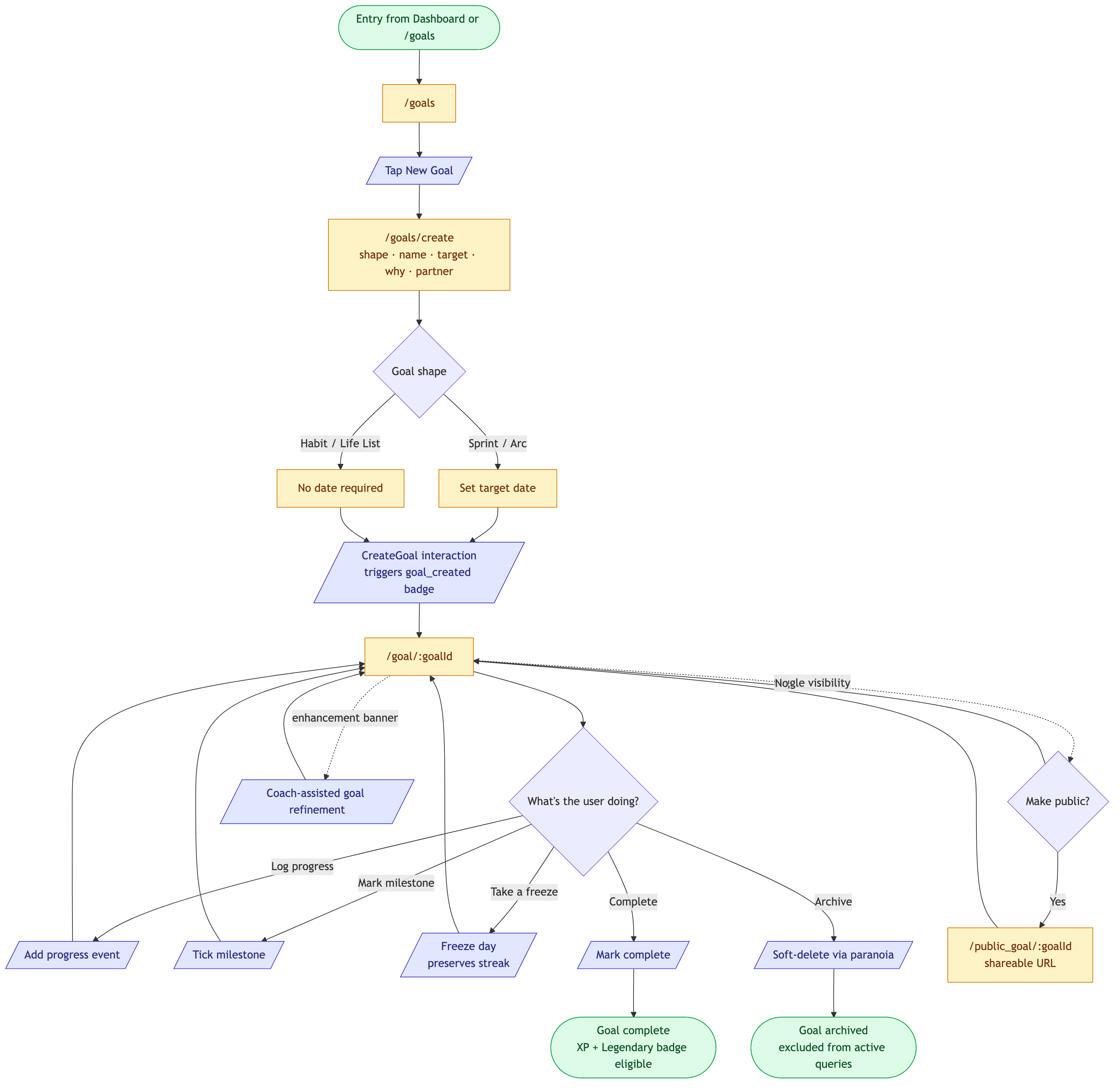
Flow C — Goal lifecycle: create → progress → public
Goal: User creates a new goal, logs progress against it over time, and optionally publishes it for accountability.
Entry points:
- Onboarding completion lands on
/goals/createfor the first goal - Dashboard "Set your first goal" CTA →
/goals/create /goalslist + the floating goal-FAB →/goals/create
Exit conditions: Goal completed_at is set (success), goal deleted_at is set (soft-delete), or goal sits indefinitely in active state (no terminal).
Maps to user-guide §4 Goals.
flowchart TD
  Entry(["Entry from Dashboard or /goals"]):::terminal --> List["/goals"]:::screen
  List --> CreateBtn[/"Tap New Goal"/]:::action
  CreateBtn --> Wizard["/goals/create<br/>shape · name · target · why · partner"]:::screen

  Wizard --> ShapeChoice{"Goal shape"}
  ShapeChoice -- "Sprint / Arc" --> NeedsDate["Set target date"]:::screen
  ShapeChoice -- "Habit / Life List" --> NoDate["No date required"]:::screen
  NeedsDate --> Created
  NoDate --> Created

  Created[/"CreateGoal interaction<br/>triggers goal_created badge"/]:::action --> Detail["/goal/:goalId"]:::screen

  Detail --> EventChoice{"What's the user doing?"}
  EventChoice -- "Log progress" --> Progress[/"Add progress event"/]:::action
  EventChoice -- "Mark milestone" --> Milestone[/"Tick milestone"/]:::action
  EventChoice -- "Take a freeze" --> Freeze[/"Freeze day<br/>preserves streak"/]:::action
  EventChoice -- "Complete" --> Completed[/"Mark complete"/]:::action
  EventChoice -- "Archive" --> Archived[/"Soft-delete via paranoia"/]:::action

  Progress --> Detail
  Milestone --> Detail
  Freeze --> Detail

  Detail -. "toggle visibility" .-> PublicToggle{"Make public?"}
  PublicToggle -- "Yes" --> PublicGoal["/public_goal/:goalId<br/>shareable URL"]:::screen
  PublicToggle -- "No" --> Detail
  PublicGoal --> Detail

  Completed --> Success(["Goal complete<br/>XP + Legendary badge eligible"]):::terminal
  Archived --> Archive(["Goal archived<br/>excluded from active queries"]):::terminal

  Detail -. "enhancement banner" .-> Coach[/"Coach-assisted goal refinement"/]:::action
  Coach --> Detail

  classDef screen fill:#fef3c7,stroke:#d97706,color:#78350f
  classDef terminal fill:#dcfce7,stroke:#16a34a,color:#14532d
  classDef action fill:#e0e7ff,stroke:#4338ca,color:#312e81
Cross-references:
- Goal shapes (Sprint / Arc / Habit / Life List): user-guide §4 Creating a goal
- Soft deletion:
acts_as_paranoidonGoalmodel (see CLAUDE.md "Soft Deletion") - Public goal page is one of the 5 public routes in the app — see site-map.md
- Coach-assisted refinement: user-guide §8 Coach-assisted goal creation
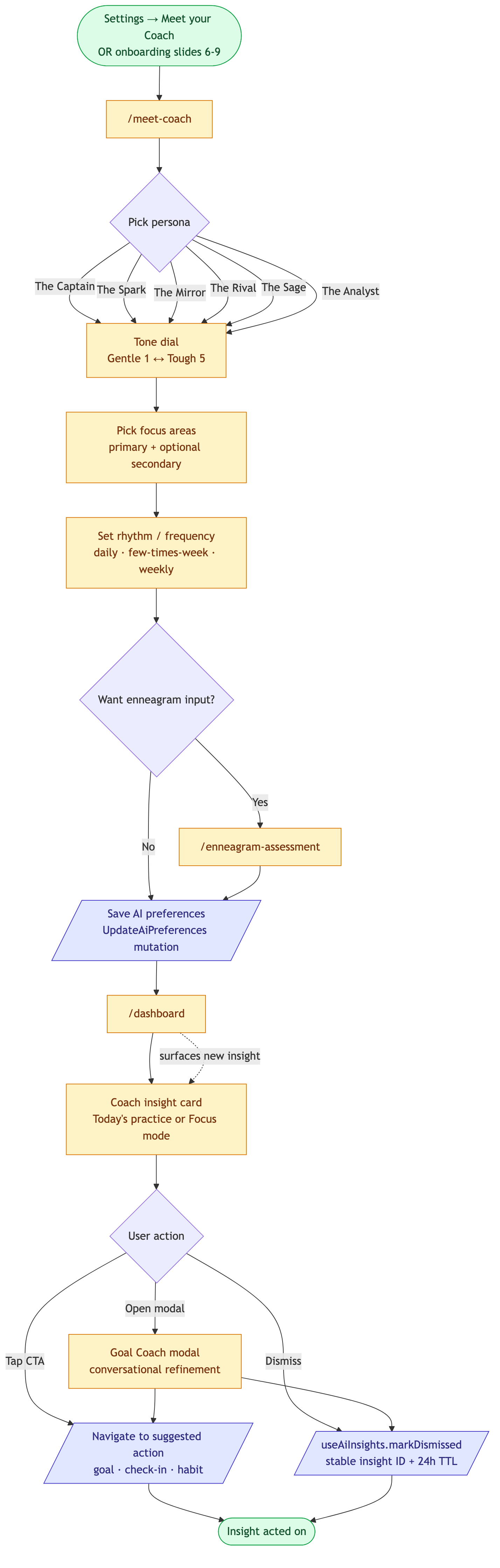
Flow D — Coach + insights: Meet Coach → daily Coach modal
Goal: User configures their Coach persona, tone, focus, and rhythm. The Coach then surfaces personalized insights inside Dashboard and Focus mode; the user acts on or dismisses them.
Entry points:
- Onboarding slides 6–9 (first-run configuration — see Flow A)
- Settings → "Meet your Coach" tab →
/meet-coach - Dashboard Coach insight card → expands the Goal Coach modal
Exit conditions: Coach configuration saved (UpdateAiPreferences) and at least one insight has been viewed or dismissed.
Maps to user-guide §7 Meet your Coach and §8 Insights and Coach modal.
flowchart TD
  Entry(["Settings → Meet your Coach<br/>OR onboarding slides 6-9"]):::terminal --> MeetCoach["/meet-coach"]:::screen

  MeetCoach --> Persona{"Pick persona"}
  Persona -- "The Captain" --> Tone
  Persona -- "The Spark" --> Tone
  Persona -- "The Mirror" --> Tone
  Persona -- "The Rival" --> Tone
  Persona -- "The Sage" --> Tone
  Persona -- "The Analyst" --> Tone

  Tone["Tone dial<br/>Gentle 1 ↔ Tough 5"]:::screen --> Focus["Pick focus areas<br/>primary + optional secondary"]:::screen
  Focus --> Rhythm["Set rhythm / frequency<br/>daily · few-times-week · weekly"]:::screen
  Rhythm --> Optional{"Want enneagram input?"}
  Optional -- "Yes" --> Enneagram["/enneagram-assessment"]:::screen
  Optional -- "No" --> Save
  Enneagram --> Save[/"Save AI preferences<br/>UpdateAiPreferences mutation"/]:::action

  Save --> Dashboard["/dashboard"]:::screen

  Dashboard --> Insight["Coach insight card<br/>Today's practice or Focus mode"]:::screen
  Insight --> Choice{"User action"}
  Choice -- "Tap CTA" --> Action[/"Navigate to suggested action<br/>goal · check-in · habit"/]:::action
  Choice -- "Dismiss" --> Dismiss[/"useAiInsights.markDismissed<br/>stable insight ID + 24h TTL"/]:::action
  Choice -- "Open modal" --> Modal["Goal Coach modal<br/>conversational refinement"]:::screen

  Modal --> Action
  Modal --> Dismiss
  Action --> Done(["Insight acted on"]):::terminal
  Dismiss --> Done

  Dashboard -. "surfaces new insight" .-> Insight

  classDef screen fill:#fef3c7,stroke:#d97706,color:#78350f
  classDef terminal fill:#dcfce7,stroke:#16a34a,color:#14532d
  classDef action fill:#e0e7ff,stroke:#4338ca,color:#312e81
Cross-references:
- Six personas: user-guide §7 Step 1 — Pick your Coach
- Tone dial: §7 Step 2 — Dial it in
- Rhythm frequencies: §7 Step 3 — Set the rhythm
- Insight dismissal gotcha (stable ID, 24h TTL):
useAiInsights.tsand the CLAUDE.md gotcha onDate.now()IDs - Deeper feature docs:
coach.md,coach-surfaces.md,enneagram.md
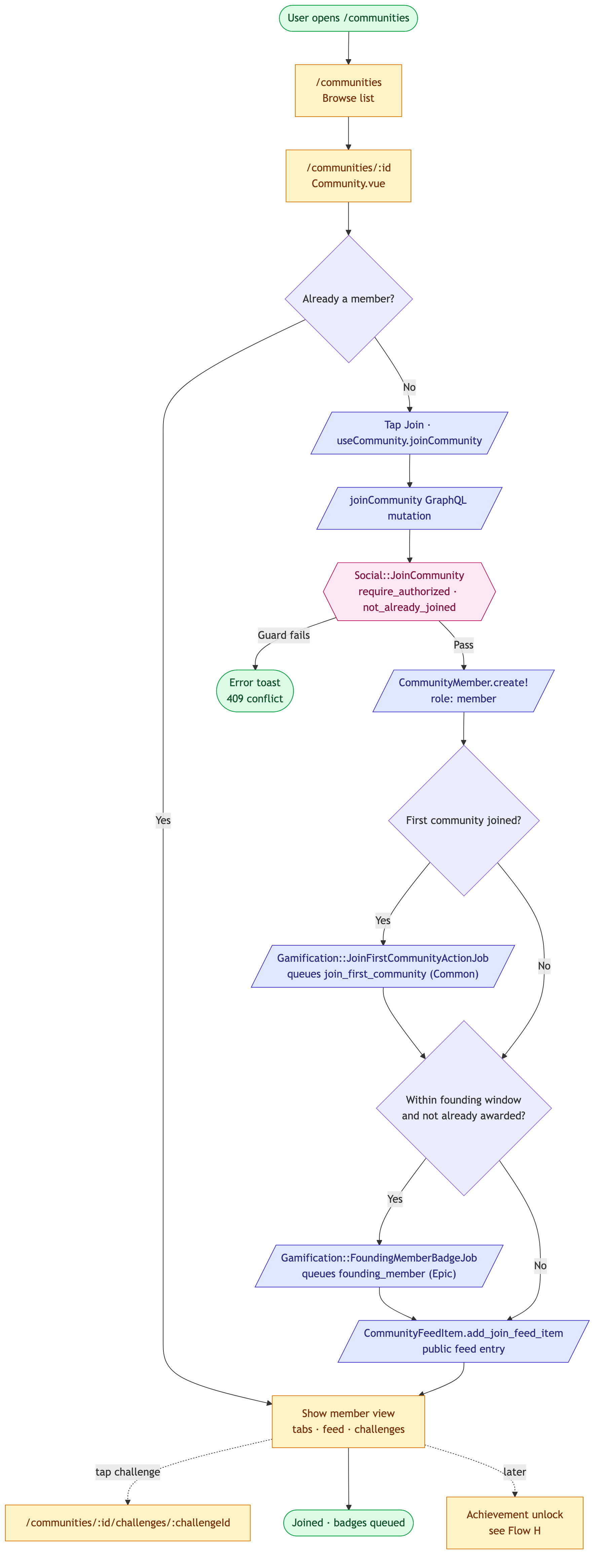
Flow E — Community join
Goal: Signed-in user discovers a community, joins it, and triggers the right gamification side effects (first-community badge, optional founding-member badge).
Entry points:
/communities(Communities tab) → browse → tap community card- Direct link to
/communities/:id(shared by another user)
Exit condition: A CommunityMember record exists for the user, the community appears on their dashboard tabs, and any first-time badges have been queued.
Maps to user-guide §11 Communities.
flowchart TD
  Start(["User opens /communities"]):::terminal --> CommList["/communities<br/>Browse list"]:::screen
  CommList --> Detail["/communities/:id<br/>Community.vue"]:::screen
  Detail --> JoinChoice{"Already a member?"}
  JoinChoice -- "Yes" --> Member["Show member view<br/>tabs · feed · challenges"]:::screen
  JoinChoice -- "No" --> JoinBtn[/"Tap Join · useCommunity.joinCommunity"/]:::action

  JoinBtn --> Mutation[/"joinCommunity GraphQL mutation"/]:::action
  Mutation --> InteractionSocial::JoinCommunity<br/>require_authorized · not_already_joined:::gate
  Interaction -- "Guard fails" --> Error(["Error toast<br/>409 conflict"]):::terminal
  Interaction -- "Pass" --> Create[/"CommunityMember.create!<br/>role: member"/]:::action

  Create --> FirstCheck{"First community joined?"}
  FirstCheck -- "Yes" --> FirstJob[/"Gamification::JoinFirstCommunityActionJob<br/>queues join_first_community (Common)"/]:::action
  FirstCheck -- "No" --> FoundingCheck

  FirstJob --> FoundingCheck{"Within founding window<br/>and not already awarded?"}
  FoundingCheck -- "Yes" --> FoundingJob[/"Gamification::FoundingMemberBadgeJob<br/>queues founding_member (Epic)"/]:::action
  FoundingCheck -- "No" --> Feed
  FoundingJob --> Feed

  Feed[/"CommunityFeedItem.add_join_feed_item<br/>public feed entry"/]:::action --> Member
  Member -. "tap challenge" .-> Challenge["/communities/:id/challenges/:challengeId"]:::screen
  Member --> Done(["Joined · badges queued"]):::terminal

  Member -. "later" .-> Achievement["Achievement unlock<br/>see Flow H"]:::screen

  classDef screen fill:#fef3c7,stroke:#d97706,color:#78350f
  classDef terminal fill:#dcfce7,stroke:#16a34a,color:#14532d
  classDef action fill:#e0e7ff,stroke:#4338ca,color:#312e81
  classDef gate fill:#fce7f3,stroke:#be185d,color:#831843
Cross-references:
- View:
Community.vue - Composable:
useCommunity.ts—joinCommunity()handler - Mutation:
JOIN_COMMUNITY_MUTATIONingraphql/social.js - Interaction:
Social::JoinCommunity - Challenges are a separate join action — joining a community does not auto-enroll the user. See §11 Community detail page.
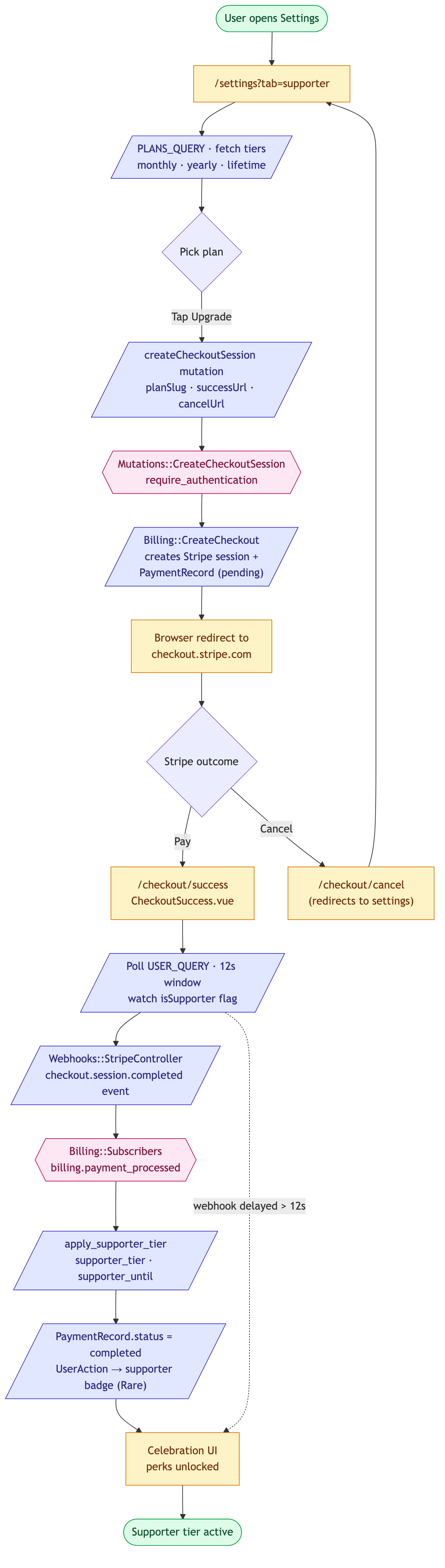
Flow F — Supporter upgrade
Goal: A signed-in user upgrades to the paid Supporter tier via Stripe Checkout. On success the user's supporter_tier field is set and the in-app supporter perks unlock.
Entry points:
/settings?tab=supporter(the canonical entry)/checkout/cancelredirect → bounces back to/settings?tab=supporterif the user abandons Stripe
Exit condition: User.supporter_tier is one of monthly/yearly/lifetime (with supporter_until set for time-bound plans) and CheckoutSuccess.vue confirms isSupporter: true.
Maps to user-guide §14 Supporter tier.
flowchart TD
  Start(["User opens Settings"]):::terminal --> Settings["/settings?tab=supporter"]:::screen
  Settings --> Plans[/"PLANS_QUERY · fetch tiers<br/>monthly · yearly · lifetime"/]:::action
  Plans --> Pick{"Pick plan"}
  Pick -- "Tap Upgrade" --> CreateSession[/"createCheckoutSession mutation<br/>planSlug · successUrl · cancelUrl"/]:::action

  CreateSession --> InteractionMutations::CreateCheckoutSession<br/>require_authentication:::gate
  Interaction --> Stripe[/"Billing::CreateCheckout<br/>creates Stripe session +<br/>PaymentRecord (pending)"/]:::action

  Stripe --> Redirect["Browser redirect to<br/>checkout.stripe.com"]:::screen
  Redirect --> StripeChoice{"Stripe outcome"}
  StripeChoice -- "Pay" --> Success["/checkout/success<br/>CheckoutSuccess.vue"]:::screen
  StripeChoice -- "Cancel" --> Cancel["/checkout/cancel<br/>(redirects to settings)"]:::screen
  Cancel --> Settings

  Success --> Poll[/"Poll USER_QUERY · 12s window<br/>watch isSupporter flag"/]:::action
  Poll --> Webhook[/"Webhooks::StripeController<br/>checkout.session.completed event"/]:::action
  Webhook --> SubscriberBilling::Subscribers<br/>billing.payment_processed:::gate
  Subscriber --> Apply[/"apply_supporter_tier<br/>supporter_tier · supporter_until"/]:::action

  Apply --> Updated[/"PaymentRecord.status = completed<br/>UserAction → supporter badge (Rare)"/]:::action
  Updated --> Celebrate["Celebration UI<br/>perks unlocked"]:::screen
  Celebrate --> Done(["Supporter tier active"]):::terminal

  Poll -. "webhook delayed > 12s" .-> Celebrate

  classDef screen fill:#fef3c7,stroke:#d97706,color:#78350f
  classDef terminal fill:#dcfce7,stroke:#16a34a,color:#14532d
  classDef action fill:#e0e7ff,stroke:#4338ca,color:#312e81
  classDef gate fill:#fce7f3,stroke:#be185d,color:#831843
Cross-references:
- Mutation:
CREATE_CHECKOUT_SESSION_MUTATIONingraphql/billing.js - GraphQL mutation:
create_checkout_session.rb - Webhook:
Webhooks::StripeController - Domain event subscriber:
Billing::Subscribers—apply_supporter_tierlives here - Success view:
CheckoutSuccess.vue— polls for ~12s before showing success regardless (webhooks may lag) - Cancel redirect: see site-map.md —
/checkout/cancel→/settings?tab=supporter
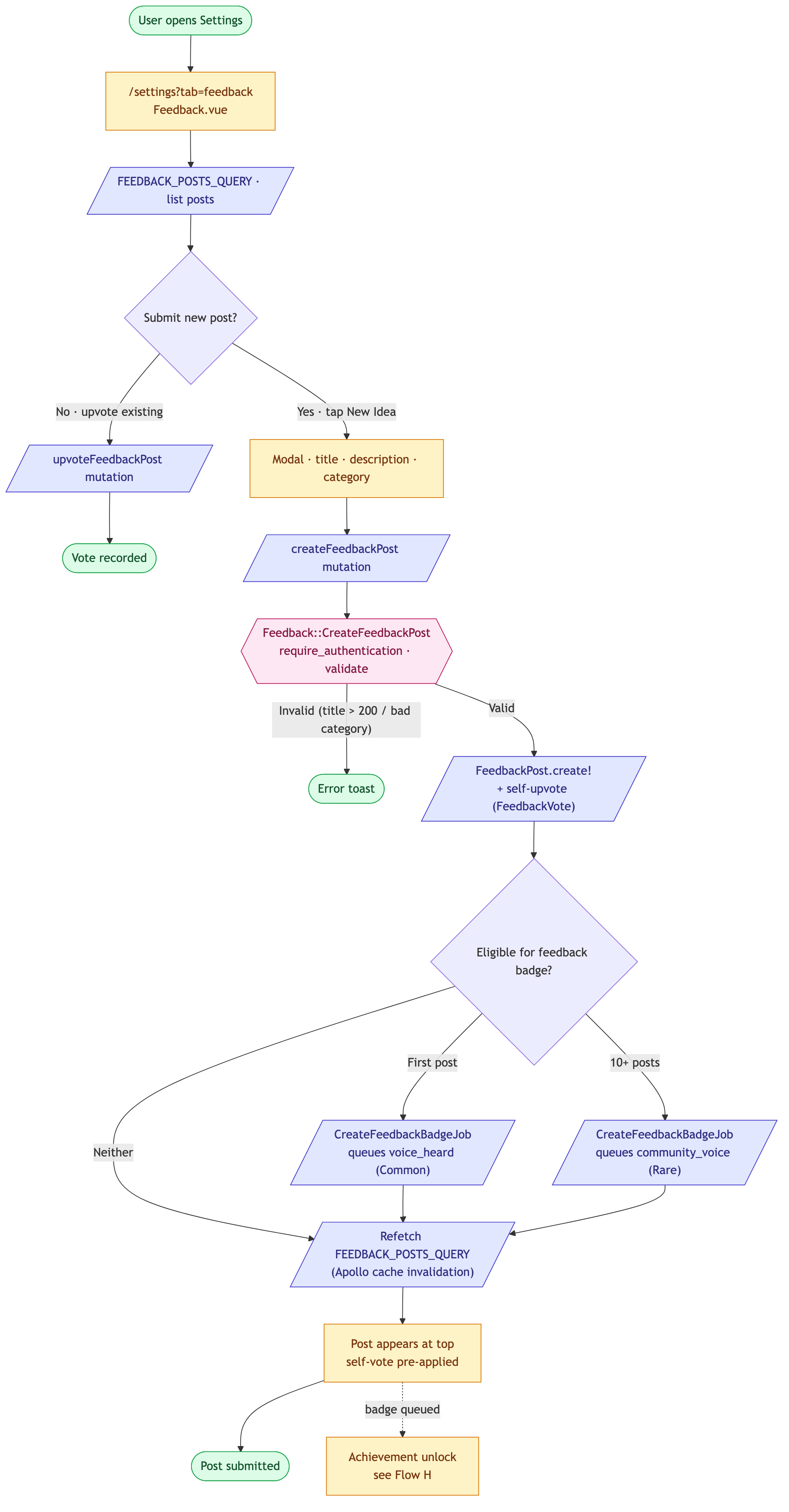
Flow G — Feedback submission
Goal: A signed-in user submits a feedback post (idea, bug report, or general comment). The post is created, auto-upvoted by its author, and may trigger a first-time-feedback badge.
Entry points:
/settings?tab=feedback(canonical)/feedbackredirect → resolves to the same Settings tab- "Feedback" link in the footer / overflow menu
Exit condition: A FeedbackPost record exists with the submitting user as author and a self-vote, and any qualifying badges have been queued via Gamification::CreateFeedbackBadgeJob.
Maps to user-guide §15 Settings and profile.
flowchart TD
  Start(["User opens Settings"]):::terminal --> Feedback["/settings?tab=feedback<br/>Feedback.vue"]:::screen
  Feedback --> List[/"FEEDBACK_POSTS_QUERY · list posts"/]:::action
  List --> NewIdea{"Submit new post?"}
  NewIdea -- "No · upvote existing" --> Upvote[/"upvoteFeedbackPost mutation"/]:::action
  Upvote --> Done(["Vote recorded"]):::terminal

  NewIdea -- "Yes · tap New Idea" --> Modal["Modal · title · description · category"]:::screen
  Modal --> Submit[/"createFeedbackPost mutation"/]:::action
  Submit --> InteractionFeedback::CreateFeedbackPost<br/>require_authentication · validate:::gate
  Interaction -- "Invalid (title > 200 / bad category)" --> Err(["Error toast"]):::terminal
  Interaction -- "Valid" --> Create[/"FeedbackPost.create!<br/>+ self-upvote (FeedbackVote)"/]:::action

  Create --> BadgeCheck{"Eligible for feedback badge?"}
  BadgeCheck -- "First post" --> FirstBadge[/"CreateFeedbackBadgeJob<br/>queues voice_heard (Common)"/]:::action
  BadgeCheck -- "10+ posts" --> TenBadge[/"CreateFeedbackBadgeJob<br/>queues community_voice (Rare)"/]:::action
  BadgeCheck -- "Neither" --> Refresh
  FirstBadge --> Refresh
  TenBadge --> Refresh

  Refresh[/"Refetch FEEDBACK_POSTS_QUERY<br/>(Apollo cache invalidation)"/]:::action --> Posted["Post appears at top<br/>self-vote pre-applied"]:::screen
  Posted --> Done2(["Post submitted"]):::terminal
  Posted -. "badge queued" .-> Achievement["Achievement unlock<br/>see Flow H"]:::screen

  classDef screen fill:#fef3c7,stroke:#d97706,color:#78350f
  classDef terminal fill:#dcfce7,stroke:#16a34a,color:#14532d
  classDef action fill:#e0e7ff,stroke:#4338ca,color:#312e81
  classDef gate fill:#fce7f3,stroke:#be185d,color:#831843
Cross-references:
- View:
Feedback.vue - Mutation:
CREATE_FEEDBACK_POST_MUTATIONingraphql/feedback.js - Interaction:
Feedback::CreateFeedbackPost— author auto-upvote happens here - Anonymous users cannot submit — the interaction enforces
require_authentication. There is no anonymous-feedback path today. /feedbackis a router redirect, not a real route — see site-map.md.
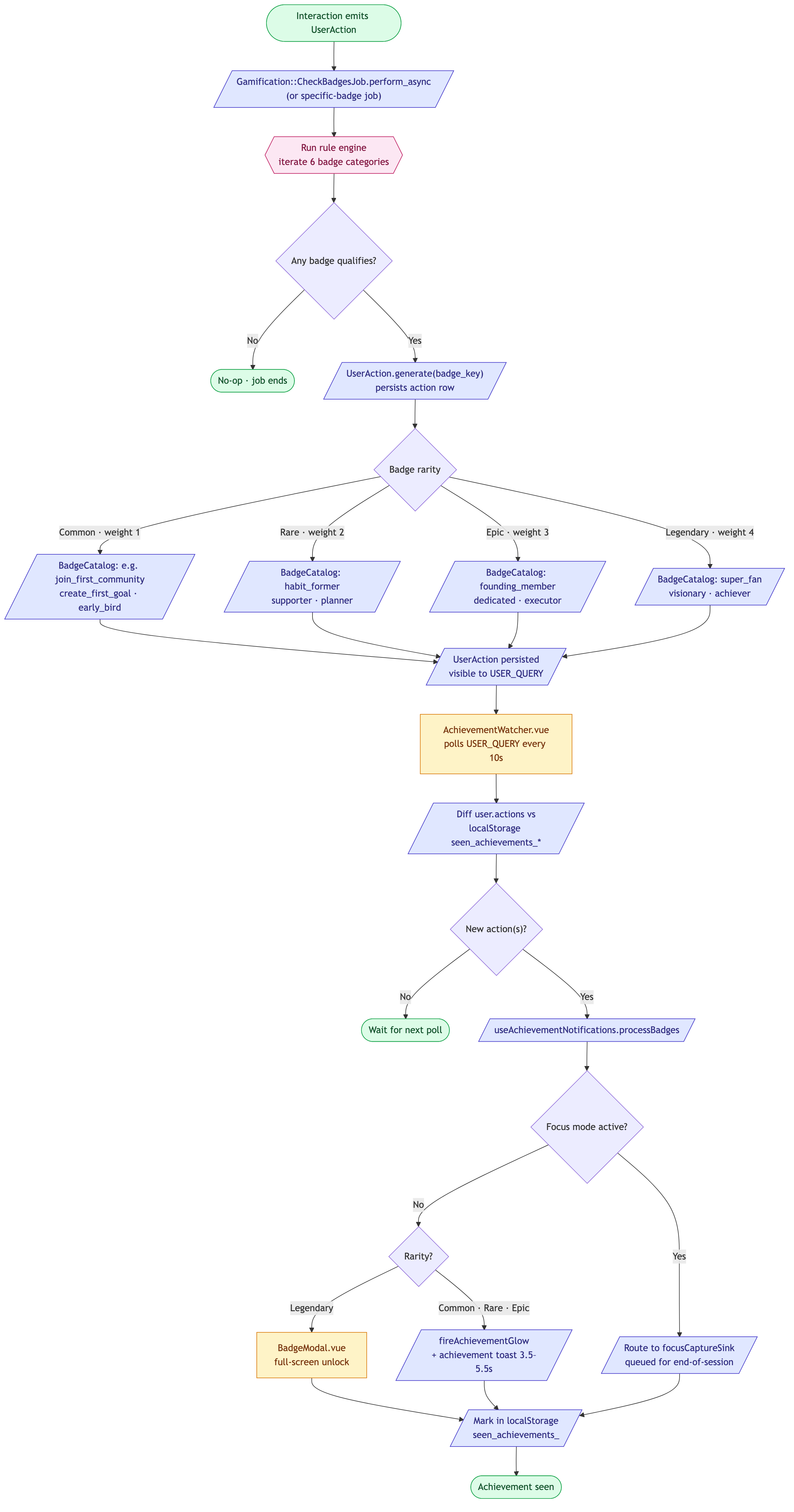
Flow H — Achievement unlock (passive)
Goal: Document the asynchronous path from an interaction-side UserAction.generate / trigger_badge call to the user seeing a celebration UI on their device.
Entry points: Implicit — any interaction that emits a UserAction is a possible trigger. Common call sites:
Social::JoinCommunity— first communityFeedback::CreateFeedbackPost— voice_heard / community_voiceSocial::AcceptPartnerRequest— first accountability partner- Any goal-event log (
HabitCheckIn, goal completion, streak milestone, etc.) Billing::Subscribers— supporter tier
Exit condition: The user has seen the celebration (toast, gold glow, or legendary modal) and the badge is marked seen in localStorage.seen_achievements_*.
Maps to user-guide §10 Achievements, XP, and ranks.
flowchart TD
  Trigger(["Interaction emits UserAction"]):::terminal --> CheckJob[/"Gamification::CheckBadgesJob.perform_async<br/>(or specific-badge job)"/]:::action
  CheckJob --> RuleEngineRun rule engine<br/>iterate 6 badge categories:::gate
  RuleEngine --> Qualified{"Any badge qualifies?"}
  Qualified -- "No" --> NoOp(["No-op · job ends"]):::terminal
  Qualified -- "Yes" --> Award[/"UserAction.generate(badge_key)<br/>persists action row"/]:::action

  Award --> Rarity{"Badge rarity"}
  Rarity -- "Common · weight 1" --> Common[/"BadgeCatalog: e.g. join_first_community<br/>create_first_goal · early_bird"/]:::action
  Rarity -- "Rare · weight 2" --> Rare[/"BadgeCatalog: habit_former<br/>supporter · planner"/]:::action
  Rarity -- "Epic · weight 3" --> Epic[/"BadgeCatalog: founding_member<br/>dedicated · executor"/]:::action
  Rarity -- "Legendary · weight 4" --> Legendary[/"BadgeCatalog: super_fan<br/>visionary · achiever"/]:::action

  Common --> Stored[/"UserAction persisted<br/>visible to USER_QUERY"/]:::action
  Rare --> Stored
  Epic --> Stored
  Legendary --> Stored

  Stored --> Watcher["AchievementWatcher.vue<br/>polls USER_QUERY every 10s"]:::screen
  Watcher --> Diff[/"Diff user.actions vs<br/>localStorage seen_achievements_*"/]:::action
  Diff --> NewOnes{"New action(s)?"}
  NewOnes -- "No" --> Wait(["Wait for next poll"]):::terminal
  NewOnes -- "Yes" --> Process[/"useAchievementNotifications.processBadges"/]:::action

  Process --> FocusCheck{"Focus mode active?"}
  FocusCheck -- "Yes" --> FocusSink[/"Route to focusCaptureSink<br/>queued for end-of-session"/]:::action
  FocusCheck -- "No" --> RarityUi{"Rarity?"}

  RarityUi -- "Legendary" --> Modal["BadgeModal.vue<br/>full-screen unlock"]:::screen
  RarityUi -- "Common · Rare · Epic" --> Glow[/"fireAchievementGlow<br/>+ achievement toast 3.5–5.5s"/]:::action

  Modal --> Seen
  Glow --> Seen
  FocusSink --> Seen
  Seen[/"Mark in localStorage<br/>seen_achievements_<userId>"/]:::action --> Done(["Achievement seen"]):::terminal

  classDef screen fill:#fef3c7,stroke:#d97706,color:#78350f
  classDef terminal fill:#dcfce7,stroke:#16a34a,color:#14532d
  classDef action fill:#e0e7ff,stroke:#4338ca,color:#312e81
  classDef gate fill:#fce7f3,stroke:#be185d,color:#831843
Cross-references:
- Renderless watcher:
AchievementWatcher.vue— pollsUSER_QUERYevery 10s - Composable:
useAchievementNotifications.ts—processBadges, glow + toast routing - Legendary modal:
BadgeModal.vue - Job:
Gamification::CheckBadgesJob— central rule engine - Badge taxonomy + rarity weights:
BadgeCatalog(5 Common · 6 Rare · 5 Epic · 5 Legendary) - Focus-mode capture pattern: any achievements unlocked while the user is in Focus mode are queued to a sink and surfaced after they exit, so the loop is never interrupted mid-flow.
Regenerating diagrams
cd docs_site
npm run docs:diagrams
This extracts every Mermaid block from site-map.md + user-flows.md and writes PNGs into docs/assets/. Re-run after editing any diagram source. The Mermaid blocks in this file are the source of truth — PNGs are derived.
Last updated: 2026-08-16 (v4.5.1) — Flow A gained the native Android Google transfer + legal-consent branch at /sso-callback (OBJ-2599). PNG re-render still pending — see "Regenerating diagrams" above; no working node_modules in this run to do it here.